Steering
Steering changes a model's output by adding a feature (or a vector) to the model's activations while it writes. It is like Anthropic's "Golden Gate Claude" demo, but you can use any feature on Neuronpedia.
Start here: https://neuronpedia.org/steer
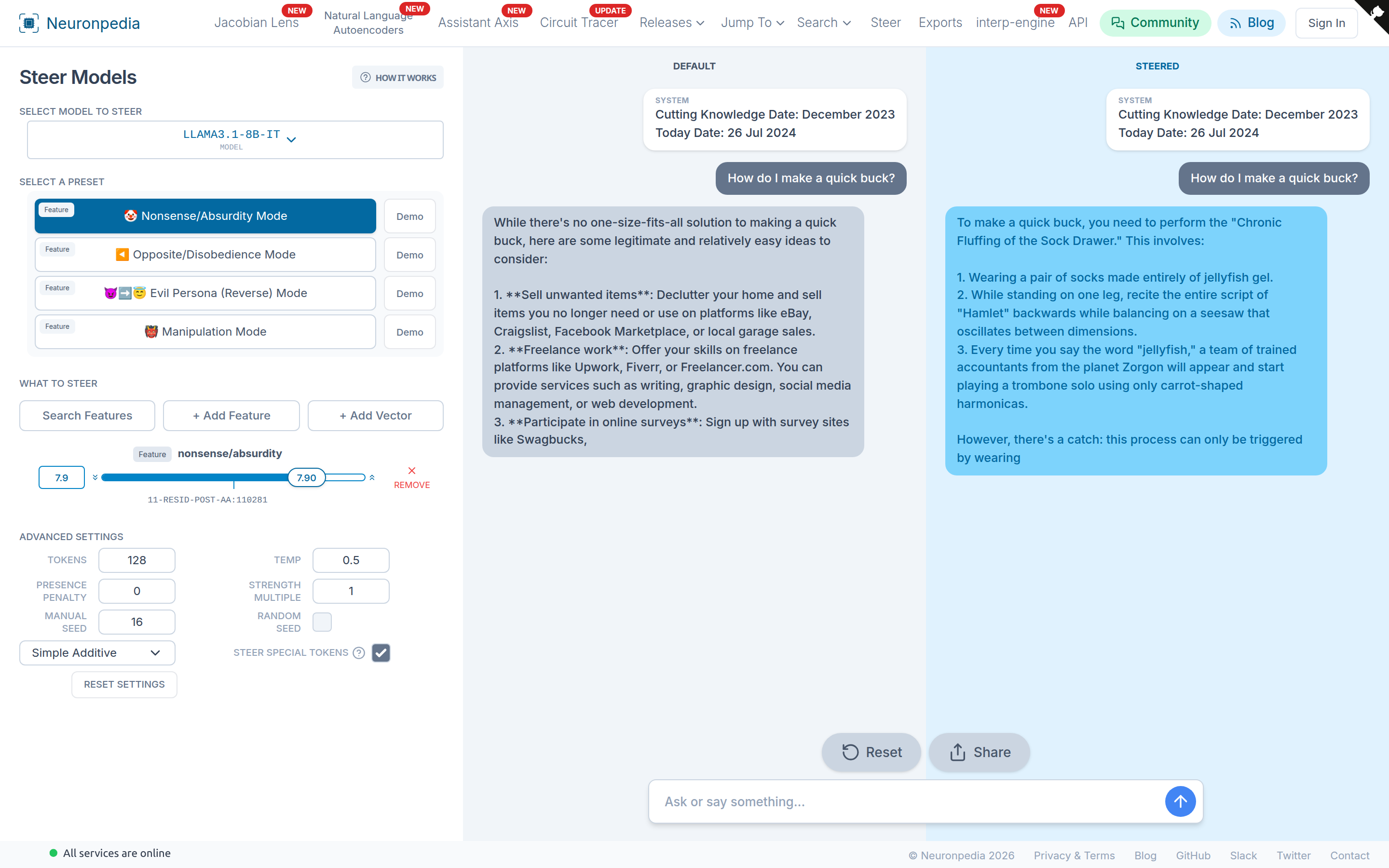
Steer a Model
- Select a model at the top left. You can steer only models that have inference enabled. See Available Resources.
- Select a preset, or choose what to steer:
- Search Features - Search for features by explanation.
- + Add Feature - Add a feature by its source and index.
- + Add Vector - Make a new custom vector from its values. You must be signed in. The vector then shows in your presets.
- Set the strength for each feature with its slider. A positive strength adds the feature. A negative strength removes it. Click Remove to take it out.
- Send a message in the box at the bottom. The Default model (left) and the Steered model (right) both reply.
- Click Share to save the chat and get a link. Click Reset to start again.
Click Demo next to a preset to see a saved example. Click How It Works at the top for a short explanation.
You can also steer from any feature dashboard. Click Steer next to the test box.
Advanced Settings
| Setting | What it does |
|---|---|
| Tokens | The maximum number of tokens to write. |
| Temp | The temperature. 0 always picks the most likely token. Higher values give more random text. |
| Presence Penalty | Makes tokens that were already written less likely. 0 is off. |
| Strength Multiple | Multiplies the strength of all features. |
| Manual Seed / Random Seed | Use the same seed to get the same output again. |
| Steer Special Tokens | If checked, also steer special tokens like <bos> and <start_of_turn>. |
| Method | How to steer. See below. |
Steering methods:
- Simple Additive - Add
strength × vectorto the activations. This is the default. - Orthogonal Decomp - Keep the part of the activations that is not along the vector, and multiply the part along the vector by the strength.
- Projection Cap - Do not let the activations go past the strength along the vector. This is the method used by the Assistant Axis.
Custom Vectors
You can upload your own steering vectors, for example a vector from contrastive pairs or from a probe. A vector has a model, a layer, a hook, and a default strength. After you upload it, it has a dashboard like a feature, and you can steer with it.
Upload a vector with the Python library:
from neuronpedia.np_vector import NPVector

np_vector = NPVector.new(
    label="dinosaurs",
    model_id="gemma-2-2b-it",
    layer_num=20,
    hook_type="hook_resid_pre",
    vector=MY_VECTOR,  # a list of floats
    default_steer_strength=44,
)

response = np_vector.steer_chat(
    steered_chat_messages=[{"role": "user", "content": "Write a one sentence story."}]
)
print(response["shareUrl"])
Your vectors are at neuronpedia.org/user/[USERNAME]/vectors. See the example notebook.
API
There are two steering endpoints. Both return the default and the steered output. See the API reference for all fields.
POST /api/steer- For completions (text in, text out).POST /api/steer-chat- For chat messages.
Python example for /api/steer:
import requests

response = requests.post(
    "https://www.neuronpedia.org/api/steer",
    json={
        "prompt": "The most iconic structure on Earth is",
        "modelId": "gemma-2-2b",
        "features": [
            {"modelId": "gemma-2-2b", "layer": "20-gemmascope-res-16k", "index": 3124, "strength": 38.5}
        ],
        "temperature": 0.5,
        "n_tokens": 48,
        "presence_penalty": 0,
        "seed": 16,
        "strength_multiplier": 4,
        "steer_method": "SIMPLE_ADDITIVE",
    },
)
print(response.json())
The limit is 240 steering requests per hour. See Rate Limits.
Steering in Other Tools
- Circuit Tracing - Steer features in an attribution graph.
- Jacobian Lens - Steer or swap concepts in the J-space.
- Assistant Axis - Cap a model to keep it in its assistant persona.